SpaceSharp vs WinDirStat
Both are free, open source disk space analyzers for Windows, and both can read an NTFS drive straight from the file table. They differ in how the map reads and in what you can do once the scan is done.
Free · open source · Windows 10 and 11 · facts checked 11 November 2026
In short
A WinDirStat alternative with a map you can read
Pick SpaceSharp if you
- want every box on the treemap to carry its name and size, and to fly into a folder with a double-click
- want to know what grew since the last scan, folder by folder
- want a list of what is safe to clear before you start deleting
- like to filter in plain words, such as videos over 500MB older than 1 year
Pick WinDirStat if you
- want sunburst and flame graphs next to the treemap
- run scans from scripts or need the result as JSON
- search by file owner or run your own cleanup commands
- prefer the tool you have used since 2003, now with a modern 2.x release
Feature by feature
SpaceSharp and WinDirStat, side by side
| Feature |  SpaceSharp | WinDirStat |
|---|---|---|
| Price | Yes.Free, for any use | Yes.Free, for any use |
| Open source | Yes.MIT license | Yes.GPL license |
| Fast scan from the NTFS file table | Yes.As administrator; otherwise it walks the folders and draws the map as it goes | Yes.When elevated, since version 2.5 |
| The map | Yes.A treemap with names and sizes on the boxes, zoom and pan, and a minimap while zoomed in | Yes.A treemap colored by file type, plus sunburst and flame graphs |
| Duplicate files, compared by contents | Yes.By size, then samples, then the full contents | Yes.By content hashes, with optional sparse hashing |
| Shows what changed since the last scan | Yes.Every scan is saved and compared in a Changes view | Partly.Saves and reopens scans; its site describes no comparison |
| Says what is safe to clear | Yes.An Insights view: temp folders, caches, old downloads, installers already run | Partly.Cleanup tools you run on what you select |
| Filter and search | Yes.Plain words, file types, size and age; the map dims what does not match | Yes.Search by name, size, type or owner |
| Export | Yes.CSV and TSV, and the map as a picture | Yes.CSV and JSON reports |
| Dark and light themes | Yes.Both, with twenty-four palettes | Yes.Dark mode since version 2.5 |
| Deletes safely | Yes.To the Recycle Bin, with one flagged exception for folders Explorer cannot open | Yes.Recycle Bin or permanent delete |
Checked on 11 November 2026 against windirstat.net and the WinDirStat 2.5 release notes. Products change; if something here is out of date, open an issue and it gets fixed.
The map
A treemap that tells you what you are looking at
WinDirStat's treemap colors each file by its type and is read together with the folder list above it: click a rectangle and the list shows what it is. That works well once you know it.
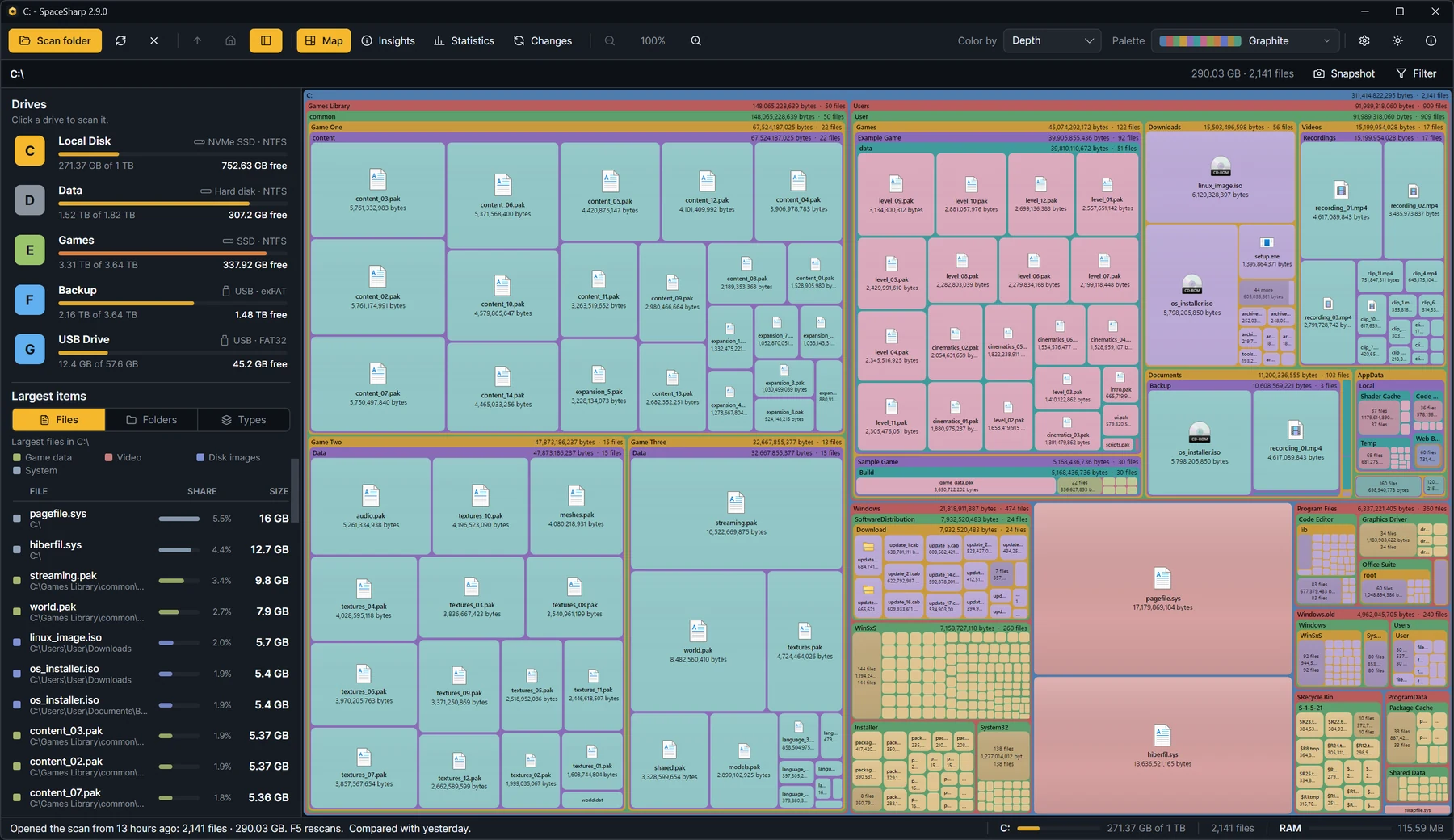
SpaceSharp follows the old SpaceMonger idea instead. Folders are frames and files are boxes, and the names and sizes are written on them, so the map can be read on its own. Double-click a folder to fly into it, scroll to zoom, drag to pan, and a minimap in the corner keeps the whole drive in view.
After the scan
See what grew, not only what is big
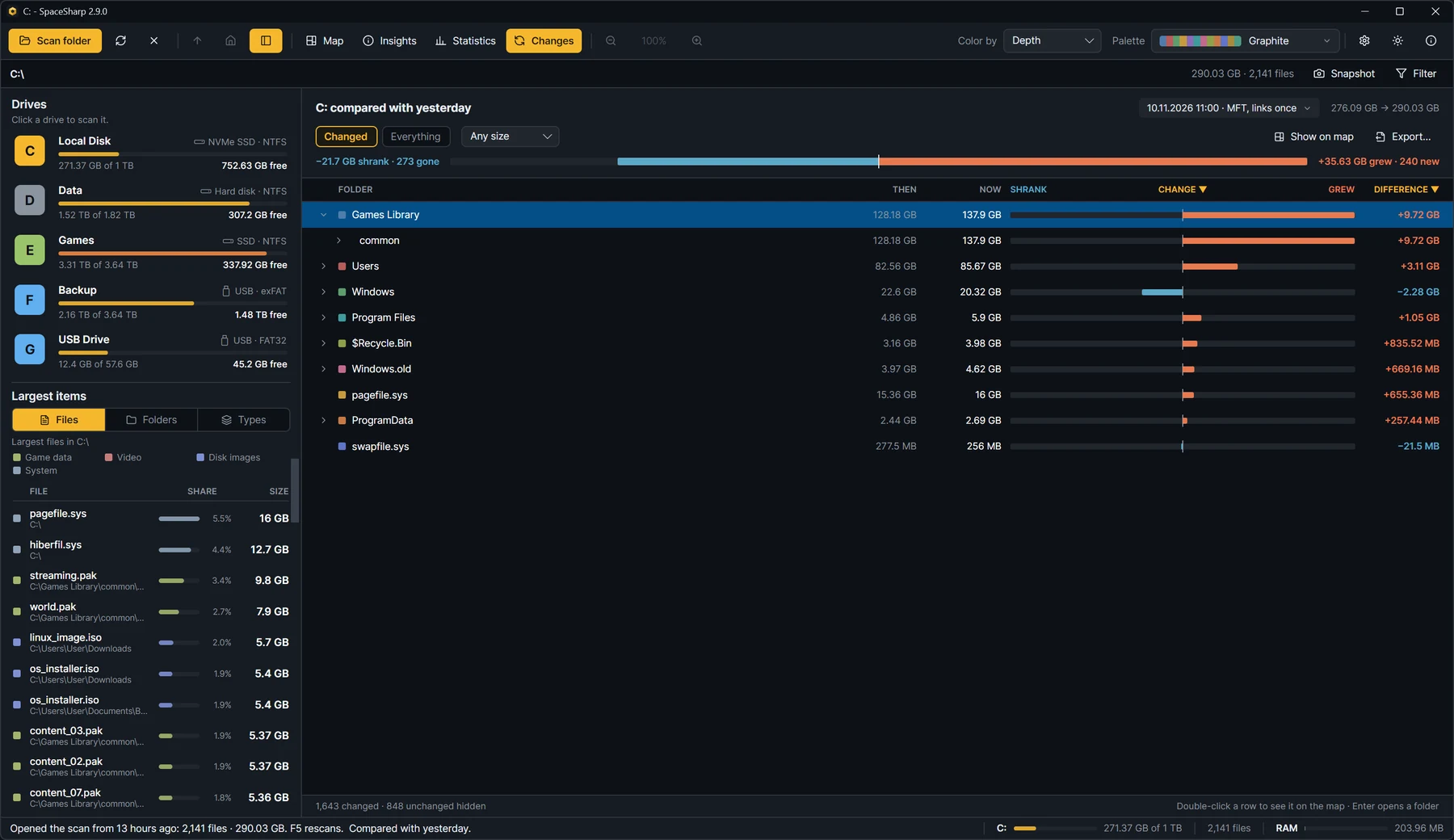
A full drive is usually a question about time: it was fine last month, so what happened? SpaceSharp saves every scan and compares it with the one before. The Changes view lists each folder's size then and now, how much it grew or shrank, and the files that appeared or disappeared.
WinDirStat can save a scan and open it again later. Its website does not describe a then-and-now comparison.
Cleaning up
A starting point for what to remove
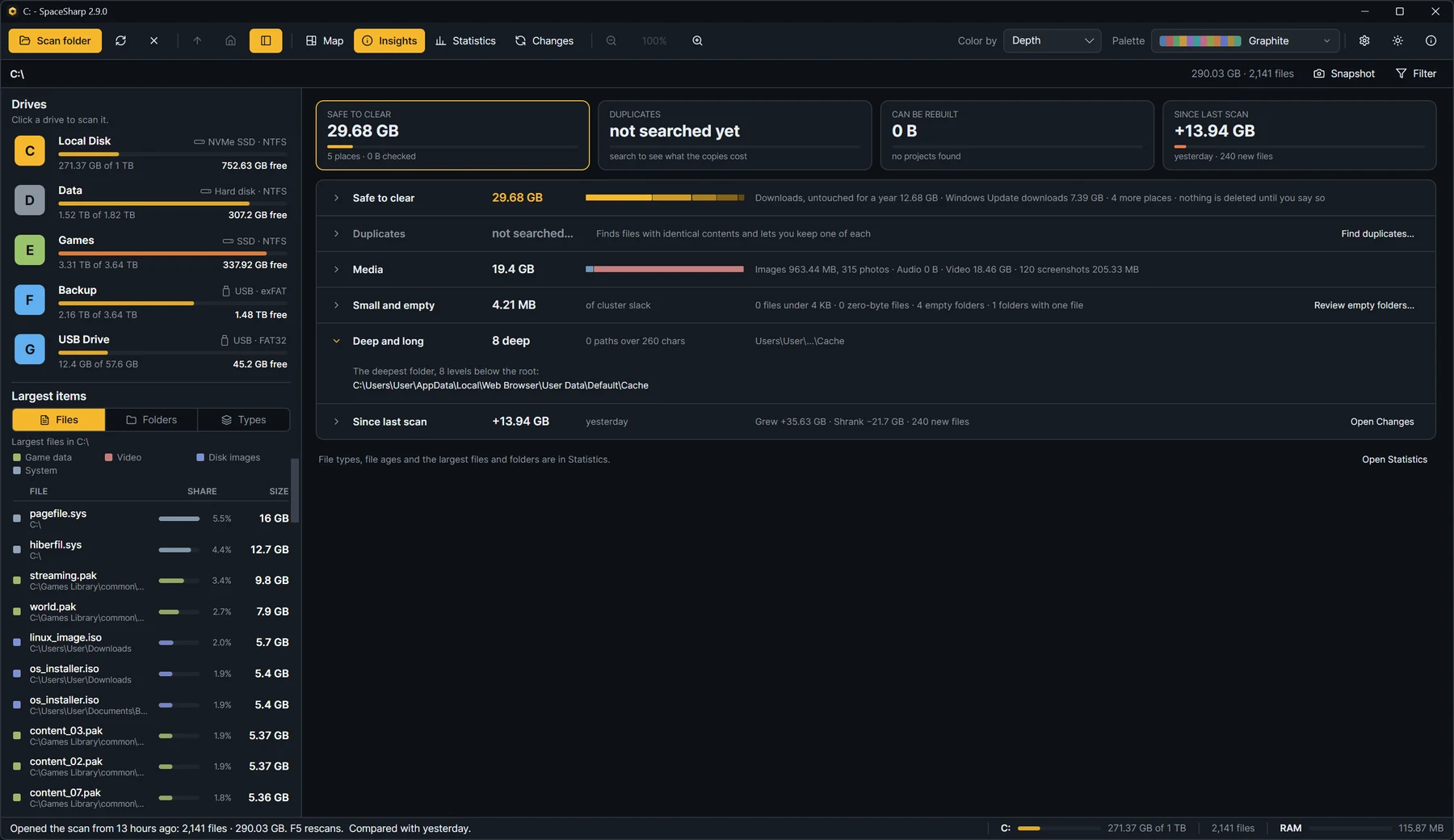
Both programs find duplicate files by comparing contents, and both send what you delete to the Recycle Bin. SpaceSharp adds an Insights view that says what is safe to clear: temp folders, caches, the Recycle Bin, old downloads and installers that have already run, with a total for each.
WinDirStat takes the opposite approach and gives you cleanup tools to run on whatever you select, including commands you define yourself.
To be fair
Where WinDirStat is the better choice
WinDirStat has been around since 2003 and its 2.x releases brought it fully up to date. It does several things SpaceSharp does not:
- More chart types: sunburst and flame graphs as well as the treemap.
- Scripting: command-line scanning and JSON export.
- Search by owner, useful on shared machines.
- Your own cleanup commands, and tools to compute file hashes.
If those matter to you, WinDirStat is a good program and there is no reason to leave it.
Moving over
Coming from WinDirStat
Nothing needs converting, and the two can sit side by side. A few things to know:
- The file type colors are still there. Set Color by to File type in the toolbar and a legend appears, much like WinDirStat's.
- The extension list lives in the Statistics view, with files by size, kind and age next to it.
- Elevation works the same way: say yes to the administrator prompt for the fast scan, or no for a normal folder walk.
- SpaceSharp does not open WinDirStat's saved scans. Scan the drive once and its own history starts from there.
Questions
SpaceSharp or WinDirStat?
Is SpaceSharp a good alternative to WinDirStat?
Yes, if you want a treemap with names on the boxes, a comparison with your last scan and a list of what is safe to clear. Both are free and open source, both read the NTFS file table for fast scans, and both find duplicates by contents. WinDirStat is the better pick if you need sunburst or flame graphs, command-line scans or JSON export.
Is SpaceSharp faster than WinDirStat?
Both read an NTFS drive from its file table when you allow administrator rights, which is what makes a scan take seconds and not minutes. We have not published a benchmark against WinDirStat 2.x, so we make no claim about which is faster. Without administrator rights both fall back to walking the folders.
Is SpaceSharp free like WinDirStat?
Yes. SpaceSharp is free for any use, at home or at work, under the MIT license. There is no paid version, no account, no ads and no telemetry. WinDirStat is also free, under the GPL.
Can I keep both installed?
Yes. They do not share settings or files. SpaceSharp also comes as a single portable exe if you would rather not install anything.
Does SpaceSharp run on older Windows versions?
SpaceSharp needs Windows 10 or 11, 64-bit or 32-bit. Windows on ARM runs the 64-bit build through emulation.
Does SpaceSharp have WinDirStat's file type colors?
Yes. Color by in the toolbar switches between top folder, folder depth and file type, and there are twenty-four palettes including color-blind-safe ones.
More comparisons
Looking at another one?
Try it on your own drive.
SpaceSharp is free and open source. Scan a drive, and if it does not suit you, WinDirStat is still right where you left it.
v2.9.0 · Windows 10 and 11 · MIT · code-signed · no telemetry