SpaceSharp vs WizTree
Both read an NTFS drive straight from the file table, so a whole drive is on screen in seconds. WizTree is closed-source freeware for personal use; SpaceSharp is open source and free everywhere, and does more with the scan once it has it.
Free · open source · Windows 10 and 11 · facts checked 11 November 2026
In short
An open source WizTree alternative, free at work too
Pick SpaceSharp if you
- want an open source tool you may use at work without buying a license
- want duplicates found by comparing file contents, not names and sizes
- want each scan compared with the last, to see what grew
- want a map you zoom into, with a list of what is safe to clear beside it
Pick WizTree if you
- scan several drives in one run
- export file lists from the command line in scripts
- work mostly from a sorted list of the largest files
- need it on a Windows version older than 10
Feature by feature
SpaceSharp and WizTree, side by side
| Feature |  SpaceSharp | WizTree |
|---|---|---|
| Price | Yes.Free, for any use | Partly.Free for personal use; commercial use needs a paid Supporter Code or license |
| Open source | Yes.MIT license | No.Closed source |
| Fast scan from the NTFS file table | Yes.As administrator; otherwise it walks the folders and draws the map as it goes | Yes.As administrator; otherwise a slower scan |
| The map | Yes.A treemap with names and sizes on the boxes, zoom and pan, and a minimap while zoomed in | Yes.A treemap below the folder tree |
| Duplicate files | Yes.Compared by contents: size, then samples, then the full file | Partly.Matched by name and size, optionally date; contents are not compared |
| Shows what changed since the last scan | Yes.Every scan is saved and compared in a Changes view | Partly.Exports to CSV and opens it again; its changelog lists no comparison |
| Says what is safe to clear | Yes.An Insights view: temp folders, caches, old downloads, installers already run | No.Not described on its site |
| Filter and search | Yes.Plain words, file types, size and age; the map dims what does not match | Yes.File search with size and date operators |
| Export | Yes.CSV and TSV, and the map as a picture | Yes.CSV, also from the command line |
| Dark mode | Yes.Dark and light, with twenty-four palettes | Yes.A dark UI theme |
| Portable version | Yes.One exe | Yes.Yes |
Checked on 11 November 2026 against diskanalyzer.com (the guide and the What's new page). Products change; if something here is out of date, open an issue and it gets fixed.
License
Free everywhere, and you can read the code
WizTree is free for personal use. Using it at work calls for a Supporter Code, and larger organizations need an enterprise license. Its source is not published.
SpaceSharp is MIT-licensed and free for any use, at home or in a company. The source is on GitHub, every download is code-signed, and the app sends nothing anywhere: no telemetry, no account, no ads.
Duplicates
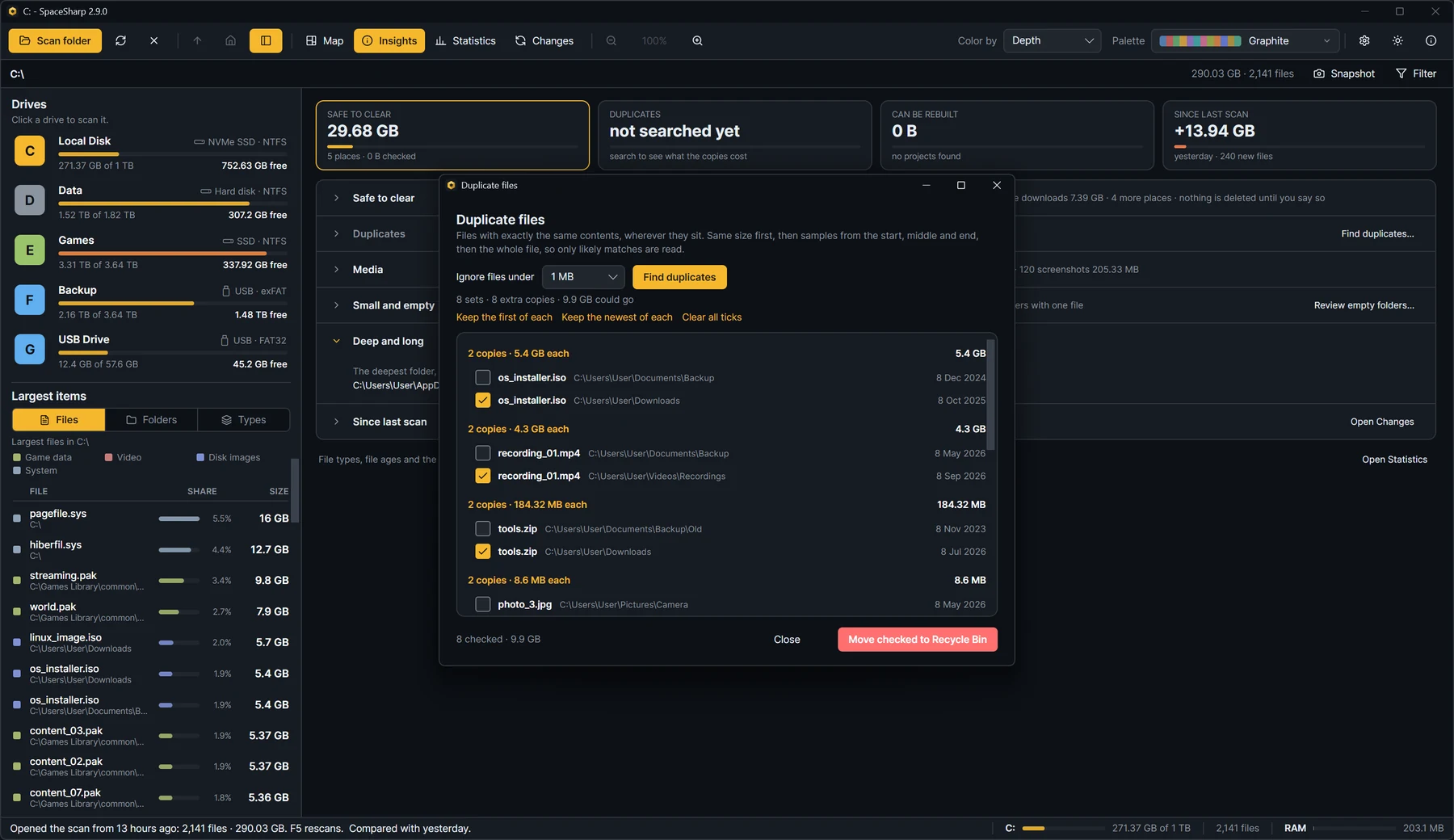
Duplicates that really are the same file
WizTree finds duplicates by name and size, optionally the date as well. Its own guide warns that it does not compare the file contents, so you have to make sure the matches are true duplicates before deleting.
SpaceSharp compares the contents. Files are grouped by size, then by samples, then read side by side until the first difference, so a set only appears when the files are identical. Two files with different names still match; two different files with the same name and size do not.
After the scan
What grew since last time
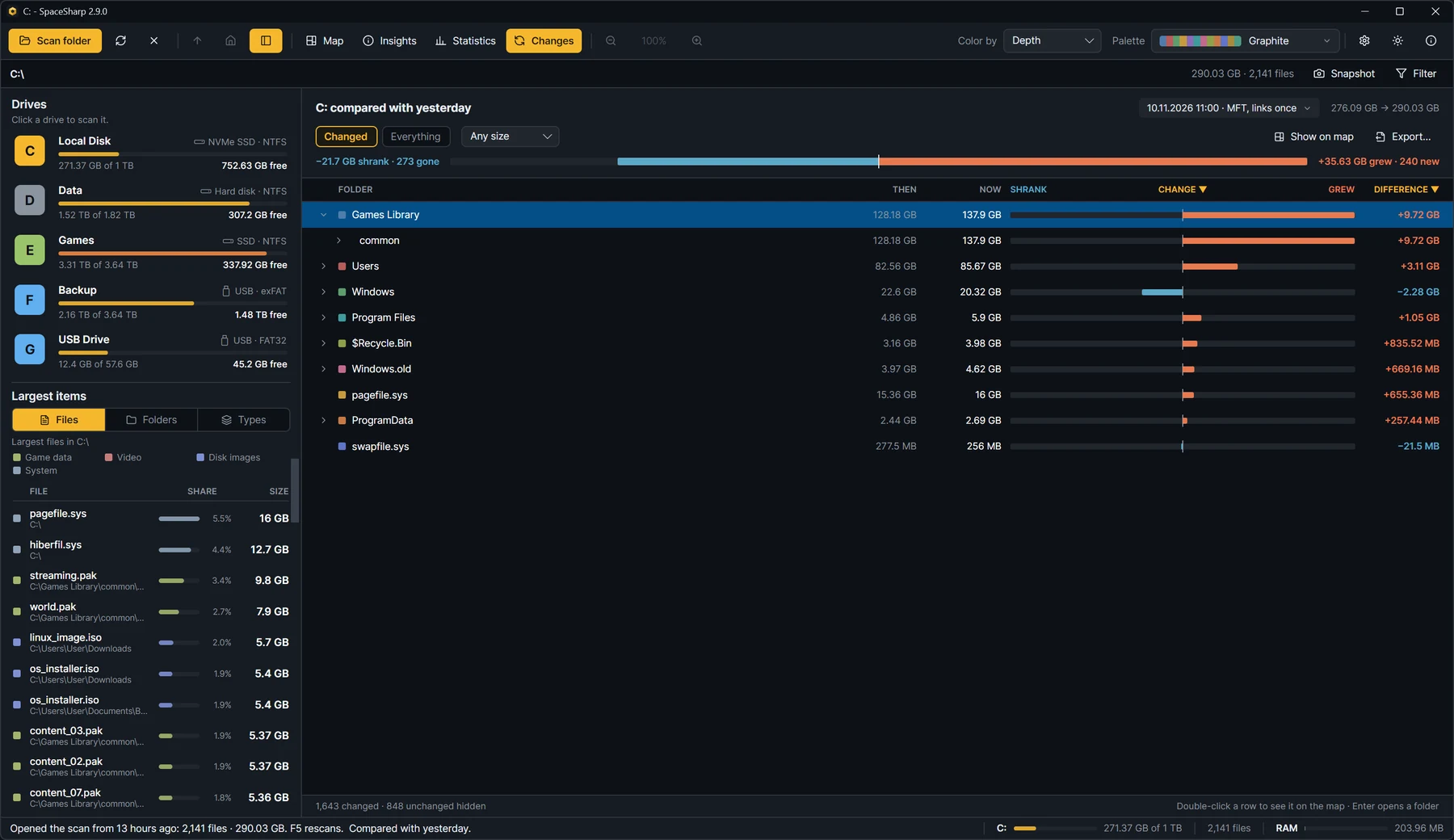
A fast scan answers what is big. The more useful question is often what changed. SpaceSharp saves every scan and compares it with the one before in a Changes view: each folder's size then and now, and the files that appeared or disappeared.
WizTree can export a scan to CSV and load it again for viewing. Its changelog does not list a comparison between two scans.
To be fair
Where WizTree is the better choice
WizTree built its name on speed and it has features SpaceSharp lacks:
- Several drives in one scan, explored separately in the same window.
- Command-line use: CSV export and a file table dump for scripts.
- A file view that sorts every file on the drive by size.
- Older Windows versions than SpaceSharp supports.
We have not benchmarked the two against each other, so we make no claim about which scans faster. Both use the same method on NTFS drives.
Moving over
Coming from WizTree
The basics carry over directly:
- Say yes to the administrator prompt for the fast file table scan, as in WizTree. Say no and SpaceSharp walks the folders and draws the map while it does.
- The largest files and folders are in the Statistics view, and each figure opens the map filtered to what it counts.
- Search operators become plain words: type videos over 500MB older than 1 year in the filter.
- CSV export works on any folder or selection from the right-click menu.
Questions
SpaceSharp or WizTree?
Is SpaceSharp a good alternative to WizTree?
Yes, especially if you need something you may use at work for free, want the source to be open, or want duplicates compared by contents. Both scan NTFS drives from the file table in seconds. WizTree is the better pick for scanning several drives at once or exporting from the command line.
Is SpaceSharp as fast as WizTree?
Both read an NTFS drive from its master file table when run as administrator, which is why a scan takes seconds. We have not published a head-to-head benchmark, so we make no claim about which is faster.
Can I use SpaceSharp at work for free?
Yes. SpaceSharp is under the MIT license and free for any use, including commercial use. There is no Supporter Code, license key or paid edition.
Is WizTree open source?
No. WizTree is closed-source freeware: free for personal use, with paid licenses for commercial use. SpaceSharp is open source under the MIT license.
How does SpaceSharp find duplicates differently from WizTree?
WizTree matches files by name and size, optionally date, and its guide notes that it does not compare contents. SpaceSharp compares the contents of the files, so a set of duplicates is only shown when the files are identical.
Does SpaceSharp need administrator rights?
Only for the fast scan of a whole NTFS drive. Without them it scans the folders the normal way, which takes longer and works on any drive or folder.
More comparisons
Looking at another one?
Try it on your own drive.
SpaceSharp is free at home and at work, with nothing to buy and nothing to sign up for.
v2.9.0 · Windows 10 and 11 · MIT · code-signed · no telemetry