A modern SpaceMonger alternative
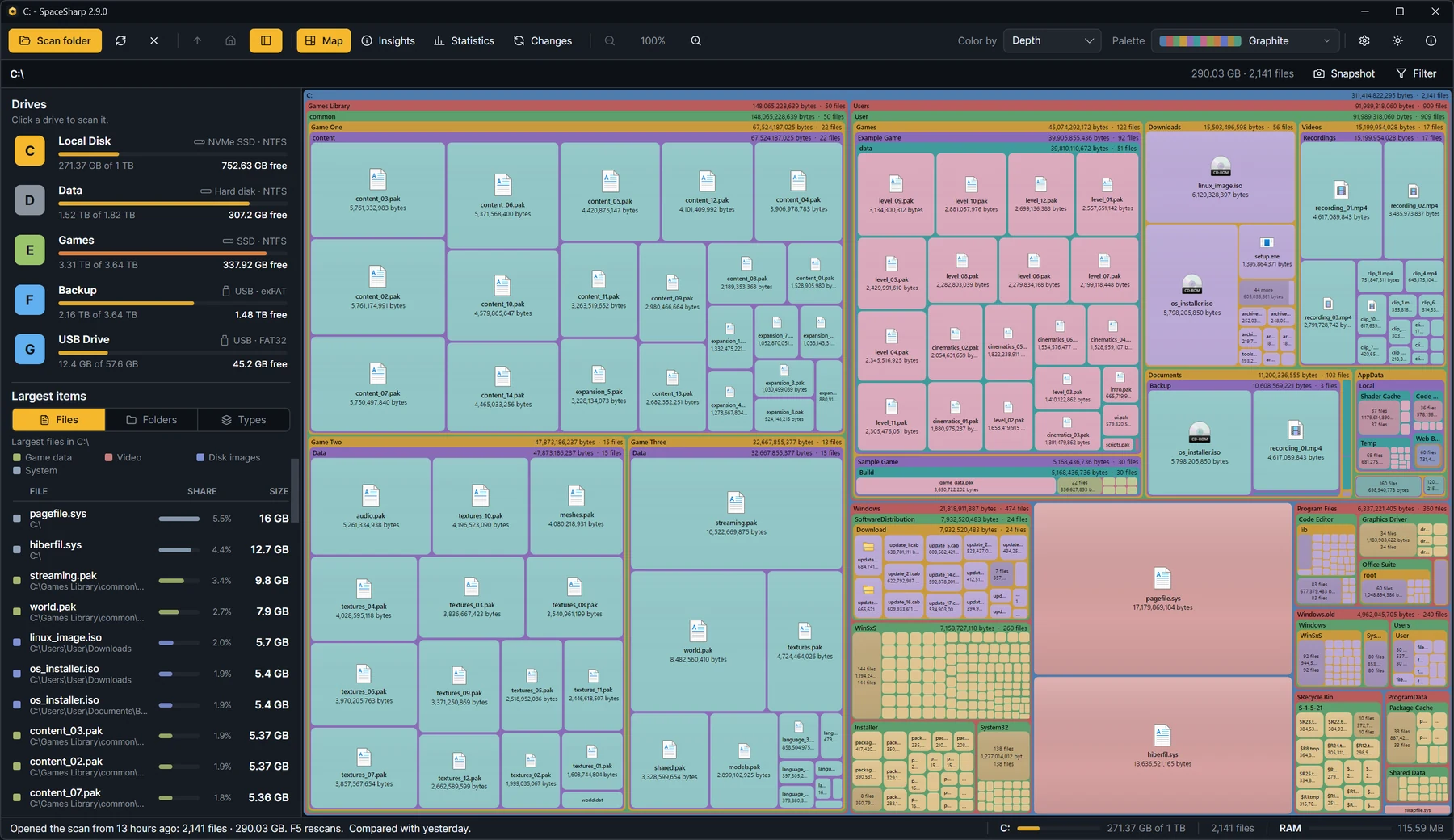
SpaceMonger showed a drive as one picture you could read without a legend: every box had its name and size on it. SpaceSharp is a free, open source disk space analyzer for Windows 11 and 10 that starts from the same idea.
What SpaceMonger got right
Most treemaps are a field of colored rectangles that you decode with a list beside them: click a box, read its name somewhere else. SpaceMonger put the answer in the picture. Folders were frames with a title, files were boxes inside them, and each one carried its own name and size. You looked for a few seconds and knew where the space was.
Many people who used it in the 2000s have been looking for that view ever since. SpaceMonger itself is still available, today as a commercial product from Stardock.
What SpaceSharp keeps
- Names and sizes on the boxes. Folders are frames with a title bar, files are boxes inside them, and both say what they are. Each box can also show its date and its real Windows file icon.
- Click into a folder. Double-click a folder and it fills the window. A path bar leads back up.
- A report in the old style. The Statistics view lays out the files by size class, kind and age, with the biggest extensions and the largest files and folders.
- One small program. A single portable exe with nothing to install, or an installer that updates itself.
What it adds
- Whole drives in seconds. Run as administrator, it reads the NTFS file table instead of opening every folder.
- What changed. Every scan is kept, and the Changes view lists each folder's size then and now.
- What is safe to clear. Insights lists temp folders, caches, old downloads and installers already run, with the space they hold.
- Duplicates and empty folders. Duplicates are compared by contents and go to the Recycle Bin.
- A filter in plain words. Type
videos over 1GB older than a yearand everything else dims. - Two ways to size the map. By bytes, as SpaceMonger did, or Uniform, where every file gets a readable box.
To be fair
SpaceSharp is not a clone and does not try to match SpaceMonger feature for feature. It scans local drives and folders; it has no cloud account scanning. It is written for Windows 10 and 11 and does not run on older versions. If you rely on something specific to SpaceMonger, check its own page before switching.
This page says little about today's SpaceMonger on purpose: every statement about another product on this site comes from that product's own pages, and its current feature list is for Stardock to describe.
Questions
Short answers
Is there a free alternative to SpaceMonger?
Yes. SpaceSharp is free for any use, at home and at work, and open source under the MIT license. Like SpaceMonger it draws a drive as a treemap with names and sizes on the boxes.
Does SpaceSharp work on Windows 11?
Yes, on Windows 11 and Windows 10, 64-bit or 32-bit. Windows on ARM runs the 64-bit build through emulation.
Is SpaceSharp made by the people behind SpaceMonger?
No. SpaceSharp is an independent open source project inspired by SpaceMonger's way of showing a drive. It shares no code with it and is not affiliated with Stardock.
Can I use SpaceSharp without installing it?
Yes. The portable exe is a single file that runs from any folder or a USB stick and leaves nothing behind but its settings.
What happened to the free SpaceMonger?
Early versions were distributed free of charge; the product is commercial today. If you want the same kind of map at no cost, an open source analyzer such as SpaceSharp is the closest match.
More guides
Keep reading
Try it on your own drive.
The map you remember, free and open source, for Windows 11 and 10.
v2.10.0 · Windows 10 and 11 · MIT · code-signed · no telemetry